Showing posts with label android. Show all posts

Sunday, 21 August 2016

FRee movies Download karne ka 10 most usefull website ........

FRee movies Download karne ka 10 most usefull  website    ........ 

Free movie Download karne ki 10 most useful  websites     

 movie dhekhne ka maja hi kuch alg hai . waisha  maja siyed koi tv programs me bhi nahi aata hai ,  ya kisi aur me nahi aata hai , movie entertainment ka sabse bada tarika hai. lekin  bahut sare log movie  dekhne cinemaa nahi jaa sakte hai , ya paise ki bhi dikkat ki wajah se nahi jaa sakti hai. ya kisi kisi ko movie akele dekhne me  maja aata  hai. to un sabhi logo ke liye internet se online movie download karne ka ek bahut badhiya tarika hai


ha lekin internet  se movies  free nahi milti hai . ya jo milti hai , wo hamare pasand ki nahi hoti., lekin aaj mai aapko aise hi website ki name bataunga jo, jis se  aap aapne man pasand ki movies download kar sakenge..., jaha se aap latest movies download kar sakenge, aur , jo FULL HD hoga , jaha se aap free movies download kar sakenge.....

CHahe wo movies  BOLLYWOOD


  FREE MOVIES DOWNLOAD KARNE KI ! 10 MOST WEBSITE ..                                      


Neeche  Aapko in 10  website ka name aur link diye gaye hai  , aap is link se un sabhi website par direct jaa sakte hai. aur aap new movies directally download kar sakte hai...............TORENT duniya  ki sabse badi website hai  jaha aapko har wo  chij mil sakti hai , jaise movies , song , software, etc...... lekin abhi ye torrent band ho gayi hai., lekin kuch website abhi bhi chal rahi hai. lekin neeche di gagi website ke link se directly movies download kar sakte hai....//
whithaut problems ke ..


 some list web    


2..WorldFree4U

3.Themovieswood

4.worldfree4U.ind.in

5.Filmywap

6.300Mbmovies4U

7.YOUTUBE

8.moviescounter

9.Fullhd720

10.Mkvcinema


dosto, ye 10 wo website hai, jaha se aap new movies download kar sakte hai .. aapko in sabi website par aapko HD < FULL< HD < BLURAY HD movies mill sakti hai..... wo movies ke quality ke upar depend karta hai. aap , youtube se bhi free movise download kar sakte hai, sabse pahle search me aap likhe free movies a  ab aapko jo movies pasand aaye , use download kare , , ya online dekh bhi sakte hai... aur download bhi kar sakte hai, aagar aapko jaankaari passand aaya to aap ise shayer jarur kare, taki unhe bhi pata chale ki  kaise movies download hote hai,,,,,,,,,,,,,,,,,,,,,,,,,,,,,,,,,, aagar ye jaankari , achhi lagi to aap mujhe comment kar ke bataye,m     


Friday, 5 August 2016

How We Work ! Chamcash Android AAp -- Earn unlimited by gaurav kumar how in challenge work

HOW WE WORKS?       

For getting started install champcash in  your Android  Mobaile.
SIng up  With  be given a challenge in the from of installing some apps (ALL apps are free) .when you referaal tha chalenge you can  your payouts has been transferred  in your  payout in the  from of mobaile recharge or by direct Cash deposite. you can Refer a friend and complete challenge to Earn money.


STEP BY STEP TUTERIAL .\


STEP  1.. INsTALL AND REGISTER WITH CHAMPCASH,,,,,,,,,,.

Install champcash on your Android Phone Register with CHampcash.


Image result for champ cash
Image result for champ cashyaha aap
 यहाँ   आप से जो ENTER Refer id or sponsor  मांग रहा है   ! आप उस में  ये sponcer  डाले 
Refer id :   :-     5066885   

 STEP  ::- 2. COMPLETE THE CHALLENGE  >


Affter Succesful registration ,you have to ask to complete the challange. The challange nis just  INstalling  Some apps . Once you COmplete the Challange You will became the part  of our Networking network   .


STEP ::- 3.  REfer To your Friend  

Once become member of our Networking network .you can refer your friends to earn more money.you will get paid on every user you refer.


STEP :;- 4:-  EArn UNlimited  


As your reffed friend joins with champcash and completes the challenge  then you and your above 6  levels will get its  payment in following way .
you will get 50%  of direct refer  and 10% of each user till 5 levels .After 5 lavels you will get 5%  of each  user payout . Users will get payout only After they complete challange .you can join unlimited direct user by using your Affilate link.in the following example  it is shown that how people are getting commision upto 7 levels .if you refer anyone then he will be at your levels.if you refer anyone then he will be at your Level 1 and you will get directly 505 from  him .in the distributed to your above levels according to the shown commissiin rate.


STEP::5_ HOW MUCH I CAN EARN


As according to our system we are distributing commission of 1 joining upto 7 Levels .Below is the Example Of Earning if we have to Distribute$ 2 par joining and every publiser will join 10 people in this  network n.


BENEFITS OF JOINING WITH CHAMPCASH 


#     Earn millions by just installing some apps.

#. Redeem your Earned Money  via paypal , mobaile recharge and E_ Gift card.

#. you can do mobaile recharge of any country.

#our system is 100% Free to use.

Refer your friends and start Earning immendiately.....


                                                          champcash download     


Sunday, 12 June 2016

10 useful shortcut keys for Smart Internet Users | स्मार्ट इंटरनेट यूजर बनने के लिए अपनाए ये दस शॉर्टकट

स्मार्ट इंटरनेट यूजर बनने के लिए अपनाएं ये 10 शॉर्टकटये शार्टकट की सभी ब्राउजर पर काम करते हैं


ALSO READ

messenger me multiple facebook account kaise use kare?

एंड्राइड फ़ोन को अनलॉक कैसे करे बिन पासवर्ड


अगर आपका भी इंटरनेट से बहुत राब्ता रहता है। दिन भर आपको कम्प्यूटर और इंटरनेट पर काम करना पड़ता है तो हम आपके लिए लेकर आए हैं दस ऐसे शार्ट की जो आपके काम को बना देगे 50 प्रतिशत तक आसान। इन शार्टकट के इस्तेमाल से न सिर्फ माउस से आजादी मिलेगी बल्कि आपके समय की भी बचत होगी। जानिए, कौन सी हैं वो शार्ट की और क्या है उसकी उपयोगिता…


1. Ctrl+ (1-8)
इंटरनेट पर काम करते हुए अक्सर ढ़ेर सारे टैब खुल जाते हैं और उनमें स्विच करने के लिए बार बार माउस पर जाना होता है। लेकिन अब इस शार्टकट का इस्तेमाल करके आप आसानी से एक दूसरे टैब में जा सकते हैं। मान लीजिए आपको तीसरे टैब में जाना है तो शार्टकट होगा… ctrl+3.


2. Ctrl+shift+t
अगर गलती से कोई टैब बंद हो जाता है तो परेशान होने की जरूरत नहीं है। इस शार्टकट के इस्तेमाल से उसे दोबारा खोला जा सकता है।


3. Alt+f4
ब्राउजर को बंद करने के लिए इस शार्टकट का इस्तेमाल किया जाता है।


4. Alt+Right Arrow
ऑनलाइन वीडियो देखते हुए अगर उसे फार्वर्ड करना हुआ तो हमें माउस के प्वाइंटर का इस्तेमाल करना पड़ता है। लेकिन इस शार्टकट के इस्तेमाल से ऑनलाइन वीडियो को फारवर्ड किया जा सकता है।


5. Ctrl+Enter
जब हमें कोई वेबसाइट सर्च करनी होती है तो हम पूरा यूआएल डालते हैं मतलब पहले www और अंत में .com लगात हैं। लेकिन इस शार्ट कट के इस्तेमाल से हमे सिर्फ शब्द डालने होंगे और ये शार्ट कट की दबाना होगा। शुरू में www और अंत में .com खुद ब खुद लग जाएगा।


6. Ctrl+D
सर्फिंग करते हुए कोई जरूरी पेज मिल जाता है जिसे हम बाद मे पढ़ना चाहते हैं तो उसे बुकमार्क करने के लिए इस शार्टकट की इस्तेमाल करते हैं।


7. Ctrl+Shift+del
ये शार्टकट की ब्राउजर हिस्टरी को डिलीट करने के लिए इस्तेमाल होता है।


8. F5
कोई भी पेज रिलोड करने के लिए इस शार्ट की का इस्तेमाल करते हैं।


9. F11
फुल स्क्रीन मोड पर जाने के लिए इस शार्ट की इस्तेमाल काम को आसान बना देता है।


Saturday, 11 June 2016

GOOGLE PAR MOBILE PHONE KA PATA KAISE LAGAYE ---FIND MY PHONE

GOOGLE PAR MOBILE PHONE KA  PATA KAISE LAGAYE --FIND MY MOBILE PHONE 


Image result for google map
 DOSTO AAJ HAM AAP SAB SE EK AISHI BAAT BATANE JAA RAHA  hu ki aaj ke duniya me smart phone jo rakhte hai unhe pata hona bahut jariri hai.. 
aisha kai baar hamare sath hota hai ki  mai aapna phon kahi rakh dete hai , ya charge me laga dete hai , ya hamari bhul se kahi aisi jgah rakha jaata hai , jisse ham khojte khojte thak jaate hai aur hame phone nahi mil raha hota hai .
 kaise ham aapni khoye huye smart phone ko google ke madhyam se khoj paate hai  . o bhi ham aapni phone ko bahut asaan tarike se khoj paate hai .
queit way me ham aapni phone ko khoj paate hai .
ab aap sochte honge ki  ha lekin kaise . pata lagaye .
 uske liye aapko kuch step ko follow karna hai.
usko pata lagana  bahut sral hai , bus aapko karna ye hai. ki computer me search  karo ''find my phone''.Aap google par apne mobaile ki lucation dekh sakte hai  ki bo kaha hai , aur usme ring bhi baja sakte hai .
Image result for google map


iske alawa bhi bahut si jaankari hindi me hai [radiantgaurav] par  aap unko bhi jarur padhe .

#1 . sabse pahle google.com par jaao  fir usme type karo '' find my phone '' jaise aapko niche  image dikh raha hai.
#2 . aapne aap atomaticali google par ek map aa jayega . ab aapko aapne us gmail id se login karna hai jo aap aapne mobaile me dala hai.
#3 .aap jaise hi  sing in karoge aapke mobile ko google search krne lagega .
#4 . jaise hi aapke mobaile ki lucation google ko pata chalega   google map par dikhne lagegi . mobaile ki jo location hogi uska ek area hoga 24 meter ka 
#5.ab aap us jagah par ja kar mobile ki ring baja sakte hai . uske liye ring ki button par click karo.
bus kuch pal me aapke mobaile me ring bajne lagega .
#6. ab aapke mobaile me ring bjna strt ho jyengi.  lagataar 5 mintue tak bajengi.
sabse achhibaat to yah hai ki aagar aapki mobaile silent bhi hai. to aapki mobaile ki ring bajegi o bhi full sound me .

mobaile ki location  pata karne ke liye ye function hona jaruri hai.

  • location ki service hai , o chalu hona chahiye aapke mobaile me 
  • goole aap install hona chahiye aapke mobaile me  aur sabse latest version hona chahiye aapke mobaile me 
  • us mobaile me net chalu hona chahiye 
  • ha dosto, ye jo mobile ka serch karne ka otion hamne aapko bataya o sirf abhi  lAptop pe hi kaam karta hai , mobaile pe nahi aap mobaile se pata nahi laga sakte hai aapne phone ka .


also read


agar aapko kuch bhi janna hai  to comment karke mujhe bataiye or aagar aapko  iske alawa bhi aap koi tarika jante hai, to aap hame batana na bhule .


agar aapko ye jaankari pasand aaya hai to aap aapne dosto ke sath jarur shayer kare .

Tuesday, 24 May 2016

professional blogging kya hai?

 aagar aap ye post padh rahe hai, iska matlb hai ki aapko bhi professinal bloggings me intrest hai.

 aaj ke is lekh me ham jaanege ki professional blogging kya hai_ kya hota hai professional blogging

 ham jab bhi  koi cheej professionally karna chahta hu ya profesonally karte hai. to ham usse achha
iska matlab hai ki ham usse achha  earn karna chahte hai.

professinal blogging karne se pahle mai aapko thora sa blogging ka idea de deta hu.

 blog ek trah ka website hota hai. jaha log aapna knowedge or information shyer karte hai ., har roj lakho , croro. log  aapni problems ke solution ke liye google  ya fir , aalag alag serch engin me search karte hai.,

iska ye matlab nahi ki serch engin har problems ki solution rakhta hai. aisa kuch bhi nahi hai.
serch engine ka bus itna hi kaam hai ki alag alag blog aur website  se information ko clect karta hai.
aur unki hi link ko dikhata hai.

ham ye bilkul aasani se kah sakte hai ki log aapni knowledge shyer karne ke liye  blogging karte hai.....


Image result for school students in classroom


ab aapko bloggings ka thora bahut idea to aa gaya hoga , bloggings ka matlb hai  knowledge shyer karna hi hai.
 ab aapke minde me sawal aata hai ki .
ki professional blogger kya hai .
 jaise ki maine aapko pahle bataya ki proffestional blogger
 jaise ki ham pahle bata chuke hai ki..
koi cheej jo ham kisi cheej ko professionllly karte hai to , to iska matlb hota hai ki ham usse kuch earn karna chahte hai.

 ham us se kamana chahte hai . ham us se income karna chahte hai.

is trah se ham blogging ko do  categori me divide kar sakte hai.


  1. personal  or hobby blogging
  2. professional blogging

personal or hobby bloggings   personal blogging or hobby bloggers vo hote hai, jinke pass kuch story hai, o unki story ya kisi ki bhi story hai. ya fir kisi ke baare me . inka kuch specific strategy ya plane nahi hota hai. ye bina kisi motive ke shyer karte hai.


professional blogging;;:::::::::::professional blogers o hote hai hai jo blogging karke paisa earn kar lete hai . unse unka ghar chal sake ye unka ek trah ka bussiness hai.


professional blogging kya hai ?

kya yah kabhi sambhav hai ki koi bina kisi planning ke bussines kar leta hai , aisa kabhi sambhav nahi koi bhi bina kisi palnig  ke bina koi bhi  bussines nahi kar sakta hai.
nahi ye sambhav nahi .professional bloggers ke pass ek achha aur behtar plan aur strategy honi chahiye. jiske jariye o blog se paisa kamate hai . isi trah  se ek professional bloggers , ek personal blogger se alag hota hai .
aagar aapko bhi likhne ka sauk hai to aap bhi blogging me carier bana sakte hai. 
aapko likhne ka sauk hai to aap asaani se is line me aa sakte hai.
aagar aapko blogging ke jariye achha earning karna hai . to uske liye ek behtar plan , lagan , mehnat  aur patience ki jarurat hai.
bloging ye nhi hai ki aaj blogging start kiye aur kal se kamai hone lagengi.
aisa kuch bhi nahi hai.
 uske liye aapko sabse jyada mehnat aur dhairy ki jarurat hai.


Amit agrawal jo indian professional blogger ke name se jane jaATE HAI.
UNHONE aapna job blogging ke liye chhor diya tha . aaj o blogging se itna earn kar lete hai , ki shyed unhe aaj koi company unhe nahi de pata ..

jo bhi aapni job blogging ke liye chorte hai . ya fir blogging ko hi aapna job mante hai .
aaj technology ke badhte duniya me blogging se achha koi  job nhi hai.


 dosto aagar aap bhi blogging karna chahte hai to aap hamse , baat karte rahe , aur tips ke baare me jaankari lete rahe.

 ya aap hamare site pe visite karte rahe , aur  naye naye tips ki jaankari lete rahe........................................................


Sunday, 15 May 2016

INTERNET KI SOME AMAZING KNOWLEDGE AUR INTRESTING FACT HINDI ME

 INTERNET KI SOME AMAZING KNOWLEDGE AUR INTRESTING FACT HINDI ME 


  AAJ  INTERNET KI DUNIYA  SE AAJ PURE WORLD ME SHAYED HI AISA KOI HO JO , AABHI TAK INTERNET KE BAARE ME NAHI JAANTA HAI , LEKIN MUJHE AISA NAHI  LAGTA KI KOI ANJAAN HO .
]


 jab se is duniya me internet aaya hai ,internet ke aane ke baad bahut se kaam asan ho gaye hai ., aagar aap bhi agr internet use karte haI ,TO JARA SOCHIYE KI AGAR INTERNET NAHI HOTA to aapka kya hota ,,aap apna information kaha par jaa kar dhunte , ,aap bahut se kaam apne internet ke bina kaise karte ,, agar facebook ,twiter jaisi  social website  nahi hote tab aap aapne dosto ka contact me kaise aa pate ,ya kaise aapne dosto ke contect me rahte .
ha dosto, jab se internet aaya hai ,puri duniya ka najriya hi badal gaya hai .
\


 aaj internet ke bina rahna bahut  hi muskil kaam hai , sabhi milakar internet ke aane se hamre life me bahut sari changing aa gayi hai.
example , jaise ham internet ke hone se ham jyada se jyada kaa ham ghar par hi baith kar kar lete hai , aur ham kahi jaane ki paresani se bachte hai.


internet ki madad se ham kya kya karte hai.


>online shopping karte hai, 
> online mobaile recharge karte hai.
>online paisa kama sakte hai
>online koi bhi jaankaari le sakte hai.
>exam ka results online dekh sakte hai.
.>dosto se ham jude rah sakte hai , internet ki madhyam se.


ye baat ekdum sach hai ki , aap aagar internet nahi hota to aap mera post , matlab aap radiantgaurav.com ka bhi post nahi padh paate .aap ye post padh rahe hai ,to bau internet ki wajah se . dosto, mai inhi sab ko dekh kar mai aapko internet ke kuch amazing facts ko aapke sath shayer karunga , ekdam sure.

dost,  mujh pe yakin karo ,aur ise jarur padho ,ye facts bahut hi intresting hai , aapko padhne me bahut maja aayega .


internet ke baare me amazing or intresting facts:::----

FACT   1:;-  INTERNET PAR FIRST WEBSITE  6 AUGUST 1991 KO ONLINE HUA AUR  US WEBSITE KA NAME,info.cern.ch tha


FACTS  2::- internet par 800 milion se bhi jyada website hai, aur unme se bhi 350 milion se bhi jyada blog hai.


FACTS3:;-   internet par 500 se bhi jyada  new domain  every hour aur 45 milion per  year registerd hote hai ,


FACTS4::- pure duniya me jitne log rahte hai , unme se 40% log  internet ka pryog karte hai,


FACTS  5:::-internet par 3000 se bhi jyada website hack ho jaat hai.
,

FACTS  6:;-youtube par sabse pahla video"'meet at zoo" ka name  se 23 april 2005 ko javed karim  ke dwara  upload  kiya gya  tha ,


FACTS 7::- youtube par har ek secund me 100000 se jyada video  dekha jaata hai.


FACTS  8:;- youtube par  sabse jyada dekha jane wala video hai,"'Gangnam style""" jisko abhi tak 2,573,367,187 se bhi jyada baar dekha gya hai.


FACTS   9::- twiter ke kuch baate

>twiter se pahla twite 21 st march 2006 ko huaa tha 
twitwer par 310 m user hai.
> aaj twiter par 1b monthly traffic aata hai.
 83% active use hai
>3800 log kaam karte hai twiter pe.
35+ se jyada jagah office hai twiter ka 
40+ language spot karta hai , twiter


FACTS  10::- india me 25 cror se bhi jyada log internet ka prog katre hai.


FACTS  11::- mark zugarberg{founder of facebook} ke original facebook profile number id 4 hai

FACTS 12:;-   internet par first email 1971 ko ray tomlinson ke dwara send kiya gaya tha

FACTS 13:;- internet par pahla register domain name symbolics.com hai


FACTS14::-  facebook par ek secund me bhi 50000  se bhi jyada like kiye jaate hai.


FACTS  15::- internet par 37% se bhi jyada porn website hai.


FACTS 16:;- whatsaap par har ek secund me  250000 se bhi jyada msg send kiye jate hai .


FACTS 17:;- google adwords me sabse mahnga  keywords hai"''insurance""


FACTS 19::- 
FACTS  20::-
FACTS  21:;-
FACTS 22::-  

Saturday, 14 May 2016

7 Actionable Tips for Boosting Wi-Fi Signal

7 Actionable Tips for Boosting Wi-Fi Signal


Is your Wi-Fi connection so weak that it doesn’t even reach the four corners of your home?
Are you stressed with the fact that you’re getting slow internet speeds everywhere?
Are you not able to utilize the complete speed potential of your internet plan just because of inadequate Wi-Fi signal?
If the answers to above questions are Yes,  this article is a must read for you.
Boosting wifi signal
Guys, you do deserve a good Wi-Fi connection. If you have a good internet speed and want to enjoy the Internet experience, you should work towards getting quality Wi-Fi signal. Boosting Wi-Fi signal might not always require investment. Most options of increasing Wi-Fi signal strength are free and require little time as well.
Do not ever trust any Wi-Fi booster app that you see – either on your smartphone or PC. Take it logically – how can a mere app boost your reception? There’s no possibility for an app to increase your Wi-Fi range, all of them are just trying to fool you.

Here are a few actionable tips that will act as your wireless router Signal booster:

1. Perfect Position Please

Believe it or not – the no.1 reason why you’re dissatisfied with your Wi-Fi signal is the improper position of your router. Your router works by transmitting radio frequency. Radio waves can transmit through walls and objects, but that would result in signal loss. Thus, the primary thing you should make sure is that your router is not surrounded by objects that can obstruct radio waves. Take it as the foremost wireless router booster tip from me.
Boosting wifi signal1
Metal objects tend to absorb the radio waves. Make sure that none of the metal objects are near your router – they are the enemies of a good Wi-Fi signal.

2. No Microwave, No Cordless

Appliances such as microwave oven and cordless phone tend to disturb Wi-Fi connectivity. I am not telling to throw these objects out of your house, but you should try your best to make sure that these objects do not obstruct your wireless signal strength.
Most Wi-Fi routers operate at a frequency of 2.4 Ghz or 5 Ghz. And surprisingly, many cordless phones operate at the same frequency. This similarity can greatly disturb your internet speed. Check your router and cordless frequency, and make sure that they are not the same. If they are, one of them has to leave. Note that this does not apply to cell phones.

3. Altitude rocks

The best Wi-Fi booster tip you would receive from me is to keep your router at a higher position. Why? Simple logic it is – the higher the position, the lesser the disturbance. A higher position would ensure that Wi-Fi signal reaches each and every point of your house.
Boosting wifi signal2
Also, many Wi-Fi routers tend to have a habit of transmitting the signal in downward direction. Therefore, a higher altitude is an absolute requirement for awesome signal quality.

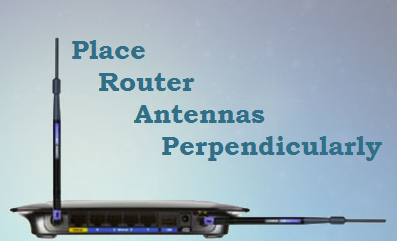
4. Make the antennae perpendicular

This is the weirdest tip for boosting Wi-Fi signal. Most Wi-Fi routers of today have 2 antennae for improved signal transmission. If you have kept both of them slightly diagonal in opposite directions just to make them look cool – it’s time to change. Keep your antennae perpendicular to each other.
Boosting wifi signal3
Sounds strange? No person I ever met has kept it this way, why should I? The reason is simple. Wifi signals work great when the antennas are parallel to their internal antenna, and it is done when the external ones are kept perpendicular to each other. Thus, to get the best output possible, keep it perpendicular!

5. Control your network

It is not that only physical factors matter for Wi-Fi transmission, a little bit of control over the router can act as a wireless router signal booster. First of all, password-protect your network. Even if you have an unlimited plan and don’t mind people accessing your network for free, do it. Hide the SSID too if possible. You might want to do social service, but this would ultimately increase the burden of your router. Also, the users connected would even kill your speed.
If too many internet-heavy tasks run simultaneously at your house, it’s time to bring in a change. Don’t run internet consuming processes such as downloading, online streaming or online gaming simultaneously if you want a decent user experience. Following these steps will definitely help in boosting Wi-Fi signal.

6. Love your router

By this statement, I do not ask you to kiss your router and worship it day and night –you should just devote a few seconds each day to maintain it. First of all, keep it a habit of restarting the router at least once a day through the control panel. Restarting the router ensures that it gets the rest it needs to function correctly. It’s a rule of thumb that all appliances need rest, don’t they?
Boosting wifi signal4
Secondly, you should install a firmware update as soon as it’s out. Firmware updates ensure that your device will deliver the best output possible and survive in the long run.

7. Extend the signal

If nothing else works for you, and you’re in need of a really huge area to be covered by your Wi-Fi, this might be the best Wi-Fi booster tip for you.
The easiest wireless router booster trick out there is to buy a Wi-Fi range extender. I would prefer buying the extender of the same company as your Wi-Fi router to get the best possible compatibility. The main disadvantage, however, with a Wi-Fi extender is that the devices connected with it experience a reduction in speed. Thus, if speed is an issue, you should not get an extender.
Boosting wifi signal5

Lastly, if you don’t want to spend a dime, the best Wi-Fi booster idea for you would be to use a metal can to extend Wi-Fi. Metal can transmit signals to places farther than the Wi-Fi router. This guide on Lifehacker can help you out.


Tuesday, 10 May 2016

GOOGLE GMAIL PAR EMAIL ACCOUNT KAISE BANAYEjaruri??

GOOGLE GMAIL PAR EMAIL ACCOUNT KAISE BANAYE??

AGAR AAP 21  B SADI KE AAGAR AAP HAI TO , AUR AAPKI  KOI EMAIL ID NAHI HAI TO , ISKA MATLB YE KI AAP ABHI BHI 20 B SADI  ME JI RAHE HAI.
 AAP SAYED JANTE BHI HONGE KI AAJ KE SAMAY ME,EMAIL ID KITNA JARURI HAI. HAR JAGAH ,EMAIL ID KI MANG HOTI HAI HAI. EXAMPLE :::-- SCHOOL. COLLEGE,OFFICE,APLICATION FORM, HAR JAGAH EMAIL ID KI MANG HOTI HAI.


KYA HOTI HAI , EMAIL ID 

 AAP THORA SA JARUR JAANTE HONGE EMAIL ID KE BAARE ME , AAP INKA NAME TO JARUR SUNA HOGA , EMAIL ID AAPKI EK VERTRUAL ID HOTI HAI. JISKI MADAD SE AAP KISI DUSRE KE EMAIL,ID PAR MESSEGE KAR SAKTE HAI. AUR AAP KUCH BHI SEND KAR SAKTE HAI. KISI DUSRE KE EMAIL ID PAR. AAP KUCH BHI SAYER KAR SAKTE HAI, IMAGE SE LEKAR , KUCH BHI SEND KARNE KE LIYE , 
HAM IS PE MESSEGE SEND KARTE HAI, INTERNET KE MADHAYAM SE 
 JO EMAIL ID HOTI HAI US ME HAMARA USERNAME HOTA HAI. AAKHRI ME HAM JIS SITE  SE EMAIL ID BANYE HAI, USKI LINK HOTI HAI . AUR USER NAME AUR  LINK KE BEECH ME @ KA SING HOTA HAI.


JAISE MERI EMAIL ID HAI::- radiantgaurav1@gmail.com


 EMAIL ID AAP KISI BHI SITE PAR BANA SAKTE HAI.YAAHOO,MICROSOFT,GMAIL.
 PAR MAI AAPKO GMAIL ID PAR ME ACCOUMT BANA KAR DIKHAUNGA KI  YE EK GMAIL KI SERVICE HAI. TO ISKE AUR BHI BAHUT FAYEDE HAI.


GMAIL PAR ACCOUNT KAISE BNATE HAI HAI

 GMAIL GOOGLE KI HI TRAH EK SERVICE HAI ISLIYE GMAIL ACCOUNT KO GOOGLE ACCOUNT BHI KAHA JAATA HAI.
 GMAIL PAR  ACCOUNT BANANA KOI MUSKIL KAAAM NAHI HAI. , SIMPLE ME AAP MERE STEP KO FOLLOW KARKE AAP  AAPNA GMAIL ACCOUNT BANA SAKTE HAI , BAHUT HI SIMPLE HAI , ACCOUNT BANNA ,  AAP MERE BATAYE GAYE STEP KO FOLLOW KAR KE AAP GMAIL ACCOUNT BANA SAKTE HAI ., AAGAR AAPKO KOI PROBLEMS AATI HAI ,TO AAP HAME COMMENT KAR KE BATAYE , MAI AAPKI PURI ACHHI TRAH SE HELP KARUNGA ,.
TO AB HAM SURU KARTE HAI GMAIL ACCOUNT BANNAE KI 
0........00000

STEP:::-- SABSE PAHLE  AAP WWW.GMAIL.COM JAYE  YA AAP  AAP GMAIL BANANE KE LIYE YAHA CLICK KARE, DIRECT PAHUCHE


STEP2::-


CREATE ACCOUNT PAR CLICK KARE, NEW ACCOUNT BANANE KE LIYE .

STEP3::_
AB AAPKE SAMNE EK FORM KHULEGI, US FORM  ME AAP AAPNI DETAIL BHARE AUR SUBMIT KARE.


  1. AB AAP APNA NAME  OR SURENAME BHARE.
  2.  AB USERNAME BHARE,,USER NAME ME AAP APNA NAME AUR NUMBER KO BHI BHAR SAKTE HAI , AISA USERNAME BHARNA HOGA JO PAHLE SE KISI KA NAHI HAI HAI,EXAMPLE::: AAPKI NAME GHANSHYAM HAI, TO AAP  AAP USER ME GHANSHYAM BHARE HO TO ,AB AAPKO ERROR BAT RAHA HAI,YO AAP  USME KUCH NUMBER LAGA DIJIA.GHANSHYAM123 LAGA DIJIA. GHANSHYAM123
  3. AB AAPKO APNE ACCOUNT KE LIYE PASSWORD LIKHNA HAI OR USKO DUBARA NEECHE BHI BHARNA HAI, PASWARD AISA hona chahiyew jo kiaapkoasaani se yaad rahe.
  4. aapko aapna date of birth dalna hai.
  5. ab aapko gender select karna hoga 
  6. aapna mobaile number dale
  7. aapko aagra ko purani email id hai to aap usko dalo ya khali hi rahne do
  8.  ab jo sabd likhkar aapke samne aa raha hai . jo veryfiy sabd ka option aa raha hai  aap usko tic kar  kar karke rahne de, ya aap niche box me daal de 
  9.  location me aap kis country se ho select karle. india  select kare.
  10. ab gmail ki teamn counduction ko maanne ke liye tic karo
  11.  ab aap next button par click karo|

STEP4k
apna mobaile number verify karna hai. aapna number check karke verify ka terika chuse, smas ke  dwara code aayega, ya fir aap ek call aayega usme code ko batayenge,ek option select karle aur uske baad continue ki button par click karo.


STEM5::- aab aapko chune huye tarika se ek code aayega ,aapke mobaile par ,usko yaha daale 


1.Apne mobaile par aaya code dale
2.countinue ki buttonpar click kare.


STEP::-Ab aapjko sanmne google+ par profile banane ki option aayrga .aap chahe to bana sakte hai ,
 agar nahi banan hai to  aap no thanx ki button par click kar de ,


STEP7::-ab aapka account ban gaya hai .aur pahli baar aapko open huaa hai isliye aapko welcome kar rahe hai hai. get started ki button par click kare.


STEP8:::-
ye lijia ab aapki acdcount ban kar taiyaar hai. ab aapko gmail team se tn messege aayega 


ab aapki account ban chuka hai ,aur khul kar aapke samne hai , ab aapko jab bhi  open karna hai ,to aaap usename ,aur pasward daal kar aap , login kar sakte hai, ab aap apna account ko  open kar sakte hai.

\

gmail me sig in sig out kaise kare

sing in karne ke liye aap www.gmail.com par jaao  or apna  email or pasward daal;kar sing in kare ,aur aapki account khul jaayega.


  1. apna email id dale.\
  2. apna oasward dale 
  3. sing in ki button par click kare.

ab aapka gmail account  open ho jayega.


jaruri::-


dosto ab aapki gmail ban chuki hai , ......................


ab aapko  koi bhi problems hai to aap mujhe bataiye ,  mai aapki problems  ko solve kar dunga . aab aap maine , aap comment kar ke puch sakte ho...................................................................................................................................................................................................................................................................................................................................................................................................................................................................................................................................................................................................................................................................................................................................................................................................................................................................................................................................................................................................................................................................................................................................................................................................................................................................................................................................................................................................................................................................................................................


Vivo V27 Pro review: All-round smartphone with focus on imaging capability

  Vivo V27 Pro review: All-round smartphone with focus on imaging capability Known for its mid-range smartphones, Vivo has leveled up from i...